Build smarter meeting spaces with Yealink video conferencing solutions in Malaysia. Meeting.com.my supplies and deploys Yealink MeetingBar, Microsoft Teams Rooms, MeetingBoard and professional room systems for huddle rooms, meeting rooms, boardrooms and enterprise collaboration spaces.
Whether you are upgrading a single conference room or standardising meeting technology across multiple offices, we help you select the right Yealink solution based on your room size, meeting platform and collaboration requirements.

The Yealink MeetingBar A25 is an all-in-one video conferencing bar designed for compact focus and huddle rooms. Its triple 4K camera system delivers an ultra-wide 151° field of view, helping everyone remain visible even when participants are seated close to the display. Built-in microphones, speaker and AI-powered video features provide a simple, space-saving solution for everyday hybrid meetings.
Best for: 2–5 people
Focus rooms, huddle rooms and compact meeting spaces where participants sit relatively close to the camera.
Choose the MeetingBar A25 when you have a small room and need very wide camera coverage without installing multiple AV devices. It is especially suitable for compact meeting spaces where simplicity, minimal cabling and easy deployment are the main priorities.
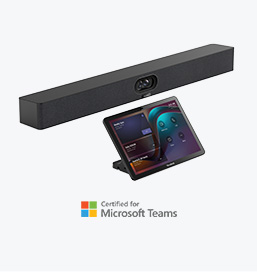
The Yealink MeetingBar A40 is a premium all-in-one video conferencing system for small to medium meeting rooms. Its dual 48MP camera system combines intelligent framing and speaker-focused views with integrated microphones and stereo speakers, creating a professional hybrid meeting experience without requiring a complex room setup.
Best for: 5–12 people
Small to medium meeting rooms, standard conference rooms and everyday corporate collaboration spaces.
Choose the MeetingBar A40 when the room is larger than a typical huddle space and you need better participant coverage, stronger audio and a more premium meeting experience. It is an excellent middle-ground option for businesses that want an integrated Yealink system without moving to a more complex modular AV solution.
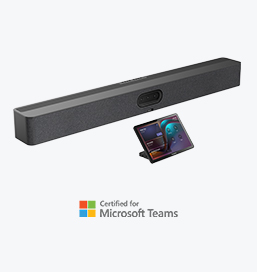
The Yealink MeetingBar A50 is an advanced all-in-one video conferencing bar designed for medium to large meeting rooms. Its triple 50MP camera system, intelligent AI-powered views and extended audio coverage help capture participants clearly across larger spaces. The A50 can also support additional Yealink microphones and audio devices when greater room coverage is required.
Best for: 7–15 people
Medium to large meeting rooms, larger conference rooms and corporate boardroom-style spaces.
Choose the MeetingBar A50 when participants are seated further from the display, the meeting table is longer, or a standard small-room video bar no longer provides sufficient camera and microphone coverage. It is particularly suitable when you want the simplicity of an all-in-one system while retaining the ability to expand the room audio when needed.

The Yealink MVC S98 is Yealink’s high-end Microsoft Teams Rooms solution for ProAV and complex meeting spaces. It supports multiple SmartVision 80 cameras together with MCore 4 computing and MTouch Plus control, providing advanced multi-camera coverage, intelligent tracking and flexible integration with professional audio systems.
Best for: ProAV and extra-large spaces
Large boardrooms, training centres, divisible rooms, classrooms and multipurpose conference environments.
Choose the MVC S98 when your room requires a customised ProAV design rather than a standard meeting-room setup. It is particularly suitable when you need multiple intelligent cameras, ceiling microphones, professional DSP audio or flexible AV integration across a large or divisible space.

The Yealink MVC S90 is an advanced Microsoft Teams Rooms solution for large boardrooms and complex meeting environments. It supports multiple Yealink UVC86 intelligent PTZ cameras, enabling different camera positions and more natural views of participants around long tables. Intelligent features such as speaker tracking, presenter tracking and IntelliFocus help remote attendees follow conversations more naturally.
Best for: Up to 25 people
Large meeting rooms, executive boardrooms, training rooms and spaces with long or complex seating layouts.
Choose the MVC S90 when one camera cannot provide sufficient coverage for the entire room. Its multi-camera architecture makes it a better choice for long boardroom tables, larger participant groups or rooms where participants need to be captured from different angles.

The Yealink MVC S80 is a Microsoft Teams Rooms system designed for large meeting rooms. It combines the SmartVision 80 intelligent camera, MCore 4 mini-PC and MTouch Plus controller to deliver professional video conferencing with intelligent participant tracking. The SmartVision 80 features a four-lens camera system with up to 20× optical zoom, helping capture participants clearly across larger spaces.
Best for: Up to 20 people
Large meeting rooms, conference rooms and larger corporate collaboration spaces.
Choose the MVC S80 when you need a dedicated Microsoft Teams Room for a large space but do not yet require a complex multi-camera installation. It is particularly suitable when you need stronger camera reach, intelligent tracking and the flexibility to integrate table or ceiling audio.

The Yealink MVC S50 is a Microsoft Teams Rooms system designed for medium to large meeting rooms. It combines the MeetingBar A50 with its triple 50MP camera system, MCore 4 mini-PC and MTouch Plus controller to provide intelligent framing, enhanced camera reach and a familiar native Teams meeting experience.
Best for: Medium to large rooms
Ideal for approximately 7–15 participants, larger conference rooms and longer meeting tables.
Choose the MVC S50 when you need greater camera coverage than the S40 while retaining a clean front-of-room design. It is particularly suitable for longer meeting rooms that need better participant close-ups, intelligent tracking and the flexibility to expand the room audio when required.

The Yealink MVC S40 is a Microsoft Teams Rooms system for small to medium meeting rooms. Featuring the SmartVision 40 dual 48MP camera, MCore computing and touch controller, it combines intelligent participant framing, built-in audio and native Microsoft Teams functionality in a streamlined room solution.
Best for: Small to medium rooms
Ideal for approximately 4–10 participants, huddle rooms and standard corporate meeting rooms.
Choose the MVC S40 when you need a dedicated Microsoft Teams Room with strong front-of-room camera coverage but want to keep the setup simple. It is well suited to everyday meeting spaces where built-in camera, microphone and speaker coverage is sufficient without a complex AV system.
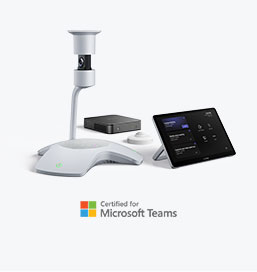
The Yealink MVC S60 offers a different meeting experience with the SmartVision 60, an intelligent 360° all-in-one camera positioned at the centre of the table. Its 10K panoramic camera captures participants around the entire table while AI features identify and focus on active speakers, creating a more inclusive experience for remote attendees.
Best for: Small to medium premium meeting rooms
Ideal for approximately 6–12 participants seated around a central conference table.
Choose the MVC S60 when meeting equity is the priority and participants sit around the table rather than facing one direction. Its centre-of-table 360° perspective helps remote attendees see everyone more naturally, making it especially suitable for collaborative discussions, round-table meetings and executive meeting spaces.
Available in 65-inch, 75-inch, and 86-inch
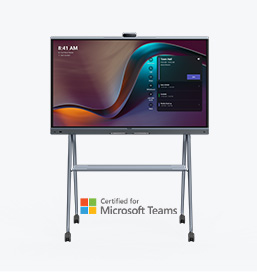
The Yealink MeetingBoard Pro for Microsoft Teams Rooms combines video conferencing, a 4K interactive touchscreen, digital whiteboarding, camera, microphones and speakers in one all-in-one collaboration display. Its triple 50MP camera system, AI-powered participant views and native Microsoft Teams experience create a clean and intuitive meeting environment with fewer separate AV devices.
65″ – 1–6 people
Small meeting rooms and collaboration spaces.
75″ – 6–12 people
Medium meeting rooms and executive collaboration spaces.
86″ – 12–20 people
Large meeting rooms and boardrooms.
Choose MeetingBoard Pro for Microsoft Teams Rooms when your organisation primarily uses Microsoft Teams and wants conferencing, presentation and interactive whiteboarding combined into one system. It is particularly suitable when you want a clean, touchscreen-based meeting room with native Teams controls and minimal equipment around the display.
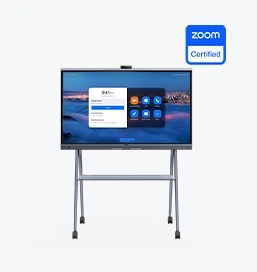
The Yealink MeetingBoard Pro for Zoom Rooms delivers an integrated Zoom collaboration experience through a 4K interactive touchscreen with built-in video conferencing, digital whiteboarding, speakers and microphones. Its triple 50MP camera system and AI-enhanced audio and video help remote participants see and hear the room clearly while keeping the physical meeting space simple and uncluttered.
65″ – 1–6 people
Small Zoom Rooms and compact collaboration spaces.
75″ – 6–12 people
Medium meeting rooms and collaborative workspaces.
86″ – 12–20 people
Large Zoom Rooms, conference rooms and boardrooms.
Choose MeetingBoard Pro for Zoom Rooms when Zoom is your organisation’s primary collaboration platform and you want a dedicated room experience rather than relying on users’ laptops. It is ideal for businesses that need video meetings, wireless content sharing and interactive whiteboarding from one central touchscreen system.
Meeting.com.my provides Yealink video conferencing solutions for businesses in Kuala Lumpur, Selangor and projects across Malaysia.
Yes. Yealink video conferencing and meeting-room products are available for business deployments in Malaysia. Meeting.com.my can assist with Yealink system selection, supply, installation and meeting-room configuration based on your project requirements.
MeetingBar systems are highly integrated video bars that combine several meeting-room functions into one device.
Yealink MVC systems are Microsoft Teams Rooms on Windows solutions that combine dedicated Teams Room computing and control with Yealink audio-video equipment.
MVC systems are particularly useful for organisations requiring Windows-based Teams Rooms or more modular configurations for larger spaces.
Yes. Yealink provides a broad range of Microsoft Teams Rooms solutions for different room sizes, including its MVC systems, MeetingBar configurations and MeetingBoard solutions.
Selected Yealink conferencing products are available for or support Zoom Rooms deployments. The correct configuration should be confirmed based on the specific Yealink model and intended platform.
Yes. Depending on the model and configuration, Yealink systems can support different workflows including Zoom and BYOD/BYOM scenarios, allowing users to access room audio and video equipment from their own laptop.
Many Yealink room solutions support compatible expansion microphones or professional audio configurations. This can be particularly useful for longer meeting tables or larger rooms where integrated microphones alone may not provide suitable coverage.
Yes. Meeting.com.my can assist with the supply, system planning, installation and configuration of Yealink meeting-room solutions in Malaysia.
Our team can also consider the display, audio, camera placement, room controls and existing AV infrastructure as part of the overall design.
Start with the room rather than the product.
Consider the number of participants, meeting table layout, room dimensions, camera distance, preferred platform, existing displays and whether additional microphones or speakers are required.
Send these details to Meeting.com.my and we can recommend a suitable starting configuration.
Our team can also consider the display, audio, camera placement, room controls and existing AV infrastructure as part of the overall design.

Indoor LED
Outdoor LED
©2026 meeting.com.my. All rights reserved
Indoor LED
Outdoor LED